Choosing the Right GCP Load Balancer: Application vs. Network
Gagan Kataria
In Part 1 of this series, we covered why any application running on more than one server needs a load balancer at all. This post answers the question that comes right after: which one?
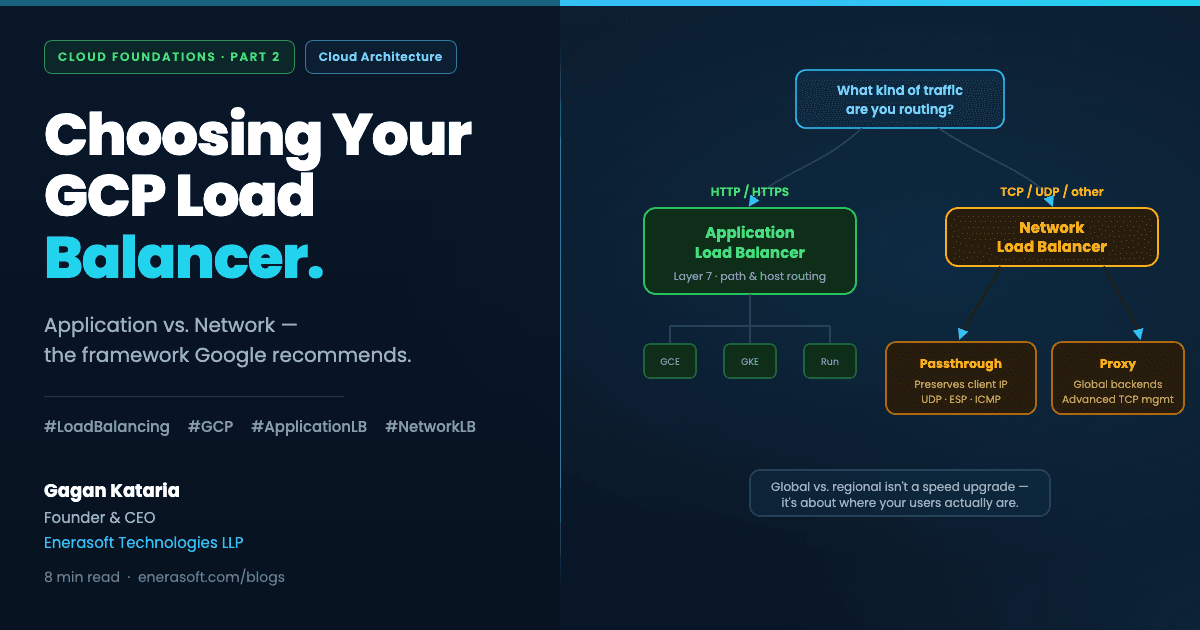
Google Cloud doesn't offer a single load balancer product. It offers a family of them, each built for a different kind of traffic, and the naming alone trips people up — Application, Network, proxy, passthrough, global, regional, internal, external. It looks like a lot until you realize almost the entire decision collapses into one question: what kind of traffic are you actually routing?
Get that one question right, and the rest of the choice mostly makes itself.
Key Takeaways
- Google Cloud classifies its load balancers into two main categories — Application Load Balancers and Network Load Balancers — and the choice starts with your traffic type, not your traffic volume.
- Application Load Balancers are proxy-based Layer 7 load balancers built specifically for HTTP and HTTPS traffic, distributing it to backends on Compute Engine, GKE, Cloud Storage, and Cloud Run.
- Proxy Network Load Balancers suit advanced traffic management with globally distributed backends, while passthrough Network Load Balancers preserve client source IP addresses and support protocols beyond HTTP, like UDP and ICMP.
- Global versus regional isn't a performance upgrade — it's a decision about where your users and your compliance requirements actually are.
- Authorization Policies for Application Load Balancers reached general availability in October 2025, adding fine-grained, attribute-based access control directly at the load balancing layer.
New to the series? Part 1 explains why your application needs a load balancer in the first place — this post picks up from there.
Start With One Question: What Kind of Traffic Is This?
Before global versus regional, before internal versus external, before any of the deployment mode decisions — there's one fork in the road that determines everything downstream.
Is this HTTP or HTTPS web traffic? Then you want an Application Load Balancer.
Is this something else — raw TCP, UDP, a protocol your application layer doesn't speak in web requests? Then you want a Network Load Balancer, and a second question follows about which kind.
Google Cloud offers various load balancers, and you must first determine the traffic type handled by the load balancer to make your selection — classified under two main categories: Application Load Balancers and Network Load Balancers (Google Cloud Blog, How to Choose the Correct Load Balancer Type). Everything else in this post is detail underneath that one branching decision.
Application Load Balancers — The Default for Most Web Apps
If you're building a SaaS product, a REST API, or anything a browser or mobile app talks to over HTTP, this is almost certainly your answer.
The Application Load Balancer is a proxy-based Layer 7 load balancer that distributes HTTP and HTTPS traffic to backends hosted on Compute Engine, GKE, Cloud Storage, and Cloud Run, as well as external backends connected over the internet or hybrid connectivity (Google Cloud Documentation, Application Load Balancer overview). "Layer 7" means it operates at the application layer — it can actually read the request. That's what unlocks capability a Network Load Balancer simply can't offer: routing /api/* to one backend and /images/* to another, redirecting based on hostname, or making decisions based on headers and cookies.
This is also where GCP has been shipping the most capability recently. Authorization Policies — fine-grained access control policies applied to Application Load Balancers to allow or deny requests based on attributes — reached general availability in October 2025, with new policy profiles in preview for 2026 supporting header-based decisions and deep payload inspection (Jayendra Patil, Google Cloud Load Balancing Types Compared, 2026). In plain terms: you can now block malicious or malformed requests at the load balancer itself, before they ever reach your application code.
Deployment modes that actually matter for most teams
Application Load Balancers come in several deployment modes, but two decisions drive almost every real-world choice:
External vs. Internal. External Application Load Balancers face the public internet — this is your default for anything customers connect to directly. Internal Application Load Balancers only route traffic within your VPC or connected networks — the right choice for service-to-service communication inside a microservices architecture that should never be reachable from outside.
Global vs. Regional. This isn't about speed — it's about where your infrastructure and your users actually are. A single-region product serving customers primarily in one geography rarely needs global. A product with users and backends spread across continents benefits from global routing that sends each user to their nearest healthy backend automatically.
Our finding: Most mid-market products we've architected at Enerasoft start with a regional external Application Load Balancer. Global becomes the right call once there's a real second region in production — not before. Provisioning for global scale you don't have yet adds complexity without adding value.
For how those public and private subnets are laid out in the first place, see why VPC is the foundation every cloud product is built on.
Network Load Balancers — When HTTP Isn't the Whole Story
Not every workload speaks HTTP. Game servers, VoIP systems, custom TCP protocols, and anything that needs to preserve the original client's IP address at the network layer all fall outside what an Application Load Balancer is built for. This is where Network Load Balancers take over — and where the choice splits again, into proxy and passthrough.
Proxy Network Load Balancer
Choose a proxy Network Load Balancer if you want to configure a reverse proxy load balancer with support for advanced traffic management or globally distributed backends (Google Cloud Blog, 2023, still current guidance as of 2026). It terminates the TCP connection at the load balancer and opens a new one to your backend — giving you more flexibility in how traffic is managed, at the cost of the original client IP being visible directly to your backend by default.
Passthrough Network Load Balancer
Choose a passthrough Network Load Balancer to preserve client source IP addresses, if you prefer direct server return, or want to support additional protocols like UDP, ESP, and ICMP (Google Cloud Blog, 2023). This is the right choice when your application logic actually depends on seeing the real client IP — fraud detection systems, certain compliance-driven logging requirements, or protocols that Application and proxy Network Load Balancers simply don't carry.
For the overwhelming majority of SaaS products and business applications, you will never need to reach for either of these — Application Load Balancer covers the traffic. But knowing they exist matters the moment you're building something that genuinely isn't a standard web app: a real-time multiplayer backend, a VoIP relay, or infrastructure serving a protocol outside HTTP.
A Quick Reference Table
| Your Situation | Recommended Load Balancer |
|---|---|
| SaaS product, REST API, standard web app | External Application Load Balancer (regional to start) |
| Microservices talking to each other inside your VPC | Internal Application Load Balancer |
| Multi-region product with real global user base | Global external Application Load Balancer |
| Need to route based on URL path or hostname | Application Load Balancer (Layer 7 required) |
| TCP traffic needing advanced routing, global backends | Proxy Network Load Balancer |
| Need to preserve client source IP, or use UDP/ICMP | Passthrough Network Load Balancer |
| Real-time gaming, VoIP, custom protocols | Passthrough Network Load Balancer |
Where This Fits With What You Already Know
If you've read the VPC post in this series, this decision slots in cleanly: your Application Load Balancer typically sits in a public subnet, terminating traffic before it ever reaches the private subnets where your actual application servers live. The load balancer choice and the VPC design aren't separate decisions — they're the same architecture viewed from two angles.
And if you've read the service accounts post, the connection continues there too: backend services behind your load balancer authenticate to other GCP resources using their own service accounts, not through the load balancer itself. Load balancing decides how traffic reaches your backends. Service accounts decide what those backends are allowed to do once traffic arrives.
Frequently Asked Questions
Can I switch load balancer types later without downtime?
It depends on the migration path, but it's rarely as simple as flipping a setting — especially moving from Network to Application Load Balancer, since the traffic handling model is fundamentally different. Google explicitly recommends migrating classic external Application Load Balancer resources to the newer global external Application Load Balancer model to access current features (Google Cloud Documentation, 2026), which suggests even within the Application Load Balancer family, migrations require planning rather than a single toggle.
Do I need a global load balancer if my users are in one country?
Usually not. Global load balancing solves for users and backends distributed across regions. If your infrastructure and customer base are concentrated in one geography, a regional load balancer is simpler to reason about and typically sufficient — you can migrate to global later if your footprint expands.
What's the difference between Layer 7 and Layer 4 load balancing?
Layer 7 (Application Load Balancer) reads the actual HTTP request — path, headers, cookies — and can route based on that content. Layer 4 (Network Load Balancer) operates purely on IP address and port, without inspecting the request content, which makes it faster for raw TCP/UDP traffic but unable to do content-based routing.
Is Cloud CDN available with all load balancer types?
No — Cloud CDN integrates with Application Load Balancers, enabling it with a single checkbox for optimizing application delivery (Google Cloud, Cloud Load Balancing product page). This is one more reason Application Load Balancer is the right default for standard web traffic — CDN integration comes built in.
What's Next in This Series
Part 3 goes one level deeper — designing load balancing for applications that genuinely span multiple regions, and the real cost and complexity tradeoffs of global versus regional that most guides skip past.
If you're mid-decision on your own load balancer architecture and want a second opinion before committing, we'd be glad to talk it through.
Written by Gagan Kataria, Founder & CEO at Enerasoft Technologies LLP — an AI-powered software and cloud engineering company based in Hyderabad, India. This is Part 2 of the Cloud Foundations series.
Sources
- Google Cloud Blog, How to choose the correct load balancer type, Selin Goksu & Muhammad Farrukh Munir, retrieved 2025-07-15, https://cloud.google.com/blog/products/networking/choosing-a-network-load-balancer-in-google-cloud/
- Google Cloud Documentation, Application Load Balancer overview, retrieved 2025-07-15, https://docs.cloud.google.com/load-balancing/docs/application-load-balancer
- Google Cloud Documentation, Load balancer feature comparison, last updated 2026-07-31, https://docs.cloud.google.com/load-balancing/docs/features
- Jayendra Patil, Google Cloud Load Balancing Types Compared [2026 Guide], retrieved 2025-07-15, https://jayendrapatil.com/google-cloud-load-balancing-types/
- Google Cloud, Cloud Load Balancing product page, retrieved 2025-07-15, https://cloud.google.com/load-balancing