Why Your Application Needs a Load Balancer (Not Just More Servers)
Gagan Kataria
A founder we spoke with recently described their scaling strategy in one sentence: "when the app gets slow, we spin up another server."
It's a common instinct, and it's not entirely wrong. More compute does help. But it misses the actual problem. Adding a second server without a way to route traffic between them doesn't make your application more reliable — it just gives you two things that can each fail alone, with no plan for what happens when one of them does.
This is the gap a load balancer closes. And it's the first real architectural decision most growing applications face.
Key Takeaways
- The Uptime Institute's 2025 outage analysis found software and configuration errors — including misconfigured load balancers — dominate the causes of downtime.
- Website downtime costs Global 2000 companies $400 billion annually, roughly 9% of total profits.
- A load balancer isn't just a traffic router — it's what makes it safe to have more than one server in the first place.
- Google Cloud's Application Load Balancers can distribute HTTP and HTTPS traffic across multiple backend instances and regions under a single global IP address.
- Health checks, not just traffic distribution, are what actually prevent a failed server from taking your application down with it.
If you haven't set up your network architecture yet, start with why VPC is the foundation every cloud product is built on — load balancing builds on top of it.
What a Load Balancer Actually Does
Picture a busy restaurant with three waiters and one host stand. Without a host, customers walk in and pick whichever waiter looks least busy — some waiters end up overwhelmed, others stand idle, and there's no plan for what happens when one waiter calls in sick mid-shift.
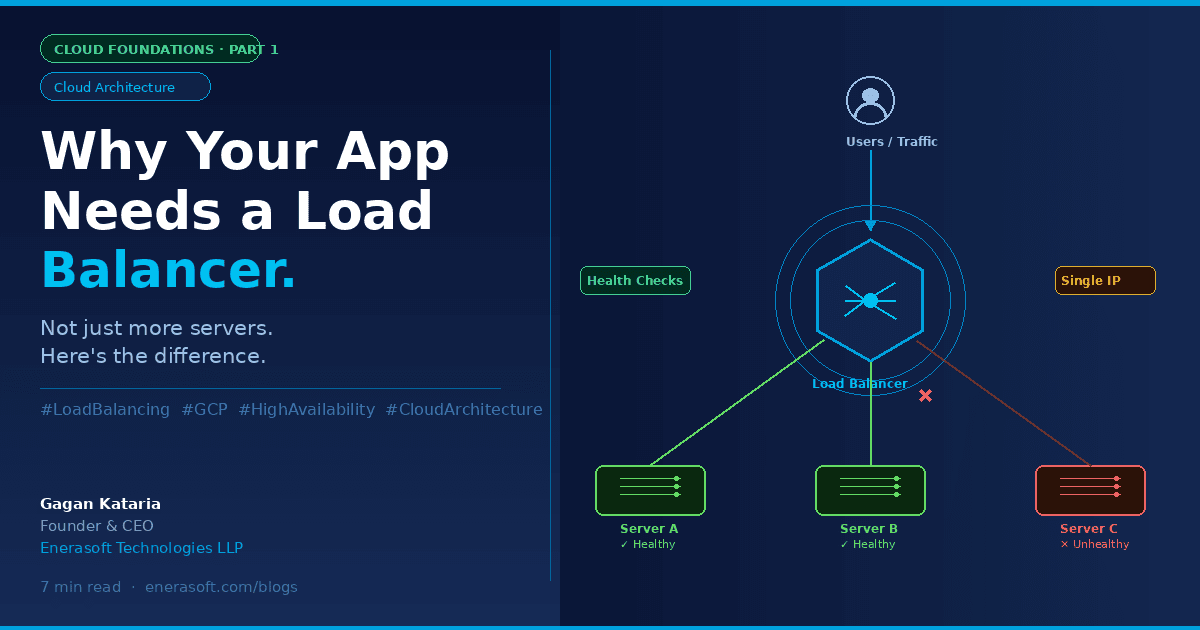
A load balancer is the host stand. Every request that arrives gets directed to whichever server can actually handle it right now — not the first one, not a random one, but the one that's healthy and has capacity. If a server goes down, the load balancer already knows and stops sending it traffic. Customers never see the empty chair.
That's the whole idea. Everything else — SSL termination, content-based routing, global distribution — is built on top of that one core job: know what's healthy, send traffic there, and do it fast enough that nobody notices.
The Real Cost of Skipping This Step
It's tempting to treat load balancing as something you'll "get to later" — a nice-to-have for when the product is bigger. That instinct gets expensive.
Global 2000 companies lose $400 billion annually to downtime — roughly 9% of total profits (Site Qwality, The True Cost of Website Downtime in 2025). You don't need to be a Global 2000 company for this math to matter. Small businesses face costs reaching $427 per minute during an outage (Visual Sentinel, Common Causes of Website Downtime, 2026) — and for a business running lean, a two-hour outage during a peak sales period can erase an entire day's revenue.
What's striking isn't just the size of the numbers. It's the cause. The Uptime Institute's 2025 root-cause breakdown found software and configuration errors dominate — bad deploys, misconfigured load balancers, expired certificates, and database migrations that lock tables longer than expected (JustAnalytics, Cost of Downtime Statistics 2026). These aren't exotic failure modes. They're the ordinary, avoidable kind — exactly the category a properly configured load balancer with health checks is built to catch before it reaches a user.
Our finding: Almost every single-server-goes-down incident we've seen didn't need to become an outage. The server failing was inevitable eventually. The outage — the part where a real customer saw an error — was optional.
Three Things a Load Balancer Gives You That "More Servers" Alone Doesn't
1. It removes the single point of failure
Two servers without a load balancer just means two single points of failure instead of one — whichever one a given user happens to hit. A load balancer sits in front of all of them, continuously checking their health, and only sends traffic to the ones that respond. When a server fails a health check, it's pulled out of rotation automatically — no page, no manual intervention, no 3am wake-up call for something the system could handle itself.
2. It lets you scale without re-architecting
Without a load balancer, adding capacity usually means someone manually updating DNS records, reconfiguring clients, or coordinating a cutover. With one in place, scaling is closer to turning a dial: add a backend instance, the load balancer picks it up, traffic distributes automatically. Compute Engine's autoscaling can automatically add or remove instances from a managed instance group based on load balancing serving capacity (Google Cloud Documentation, Load Balancing and Scaling) — meaning the system can grow and shrink itself in response to real traffic, not a guess made weeks in advance.
3. It becomes your single, stable front door
Google Cloud's Application Load Balancers can balance traffic across multiple backend instances and multiple regions, making your entire application available through a single global IP address and simplifying your DNS setup (Google Cloud, Cloud Load Balancing overview). Instead of customers or client applications needing to know about every individual server, they connect to one stable address. Everything behind it can change — servers added, removed, replaced, moved to a new region entirely — without anyone downstream noticing.
What This Looks Like Without the Jargon
You don't need to understand Layer 4 versus Layer 7 traffic, SSL termination, or backend service configuration to grasp why this matters. Here's the plain version:
- One server = works, until it doesn't, and then everything stops.
- Multiple servers, no load balancer = still fragile, just fragile in more places, and now someone has to manually decide how to split traffic between them.
- Multiple servers behind a load balancer = the system routes around failure on its own, scales without a redesign, and gives users one address that always works — even while everything behind it is changing.
That third state is the one every application eventually needs. The only real question is whether you build toward it deliberately, or discover you need it in the middle of an incident.
Where This Fits in the Bigger Picture
Load balancing doesn't exist in isolation. It sits inside the VPC architecture we covered in why VPC is the foundation every cloud product is built on — your load balancer typically lives in a public subnet, directing traffic to application servers safely tucked away in private subnets where they were never reachable directly in the first place. Get the VPC right, and the load balancer has a secure, well-structured network to operate in. Get it wrong, and no amount of clever traffic routing fixes the underlying exposure.
Google Cloud doesn't offer just one type of load balancer, either. Choosing the right one depends first on your traffic type — Application Load Balancers for flexible HTTP(S) handling, proxy Network Load Balancers for TCP traffic to backends across regions, and passthrough Network Load Balancers when you need to preserve client source IPs or support protocols beyond HTTP (Google Cloud Documentation, Choose a Load Balancer). Getting that choice right is the difference between a load balancer that quietly does its job and one that becomes its own source of configuration headaches.
Frequently Asked Questions
Do I need a load balancer if I only have one server?
Not yet — but plan for it. A single server has no failover option regardless of what sits in front of it. The moment you add a second server for either redundancy or capacity, a load balancer becomes necessary to make that second server actually useful rather than just a second point of failure.
Does a load balancer slow down my application?
A properly configured load balancer adds negligible latency — typically single-digit milliseconds — while preventing the far larger latency and downtime costs of an unhealthy server continuing to receive traffic. Google Cloud Load Balancer is a fully managed, cloud-native service built on the same technologies that power Google's own products (Pump, Google Cloud Load Balancer overview, 2025), designed specifically to avoid becoming a bottleneck itself.
What's the difference between a load balancer and autoscaling?
They work together but solve different problems. Autoscaling decides how many servers you need based on current load. The load balancer decides which of those servers gets each individual request, and continuously checks that each one is actually healthy enough to receive traffic.
Is load balancing only necessary for large-scale applications?
No. Small businesses face downtime costs reaching $427 per minute (Visual Sentinel, 2026) — proportionally, an outage can be just as damaging to a small team's revenue and reputation as it is to an enterprise. The scale of your load balancing setup should match your traffic, but the need for one starts the moment reliability starts to matter to your business.
What's Next in This Series
This post covered why load balancing matters. The next one covers the harder question: which Google Cloud load balancer should you actually use — Application, proxy Network, or passthrough Network — and how to make that decision based on your actual traffic, not guesswork.
If you're architecting a new cloud product and want a second pair of eyes on your load balancing and network design before you build, we'd be glad to talk it through.
Written by Gagan Kataria, Founder & CEO at Enerasoft Technologies LLP — an AI-powered software and cloud engineering company based in Hisar, Haryana, India. This is Part 1 of the Cloud Foundations series.
Sources
- Site Qwality, The True Cost of Website Downtime in 2025, retrieved 2025-07-08, https://siteqwality.com/blog/true-cost-website-downtime-2025/
- Visual Sentinel, Common Causes of Website Downtime (2026), retrieved 2025-07-08, https://visualsentinel.com/blog/common-causes-website-downtime
- JustAnalytics, The Cost of Downtime in 2026: Statistics Every Engineering Leader Should Know, retrieved 2025-07-08, https://justanalytics.app/blog/cost-of-downtime-statistics-2026
- Google Cloud Documentation, Cloud Load Balancing overview, retrieved 2025-07-08, https://cloud.google.com/load-balancing
- Google Cloud Documentation, Choose a load balancer, retrieved 2025-07-08, https://docs.cloud.google.com/load-balancing/docs/choosing-load-balancer
- Google Cloud Documentation, Load balancing and scaling — Compute Engine, retrieved 2025-07-08, https://docs.cloud.google.com/compute/docs/load-balancing-and-autoscaling
- Pump, Google Cloud Load Balancer: What It Is and Pricing, retrieved 2025-07-08, https://www.pump.co/blog/google-cloud-load-balancer/